> ## Documentation Index
> Fetch the complete documentation index at: https://docs.zbdpay.com/llms.txt
> Use this file to discover all available pages before exploring further.
# ZBD Earn SDK
> Add real-money rewards to your Unity mobile game. No backend required to get started.
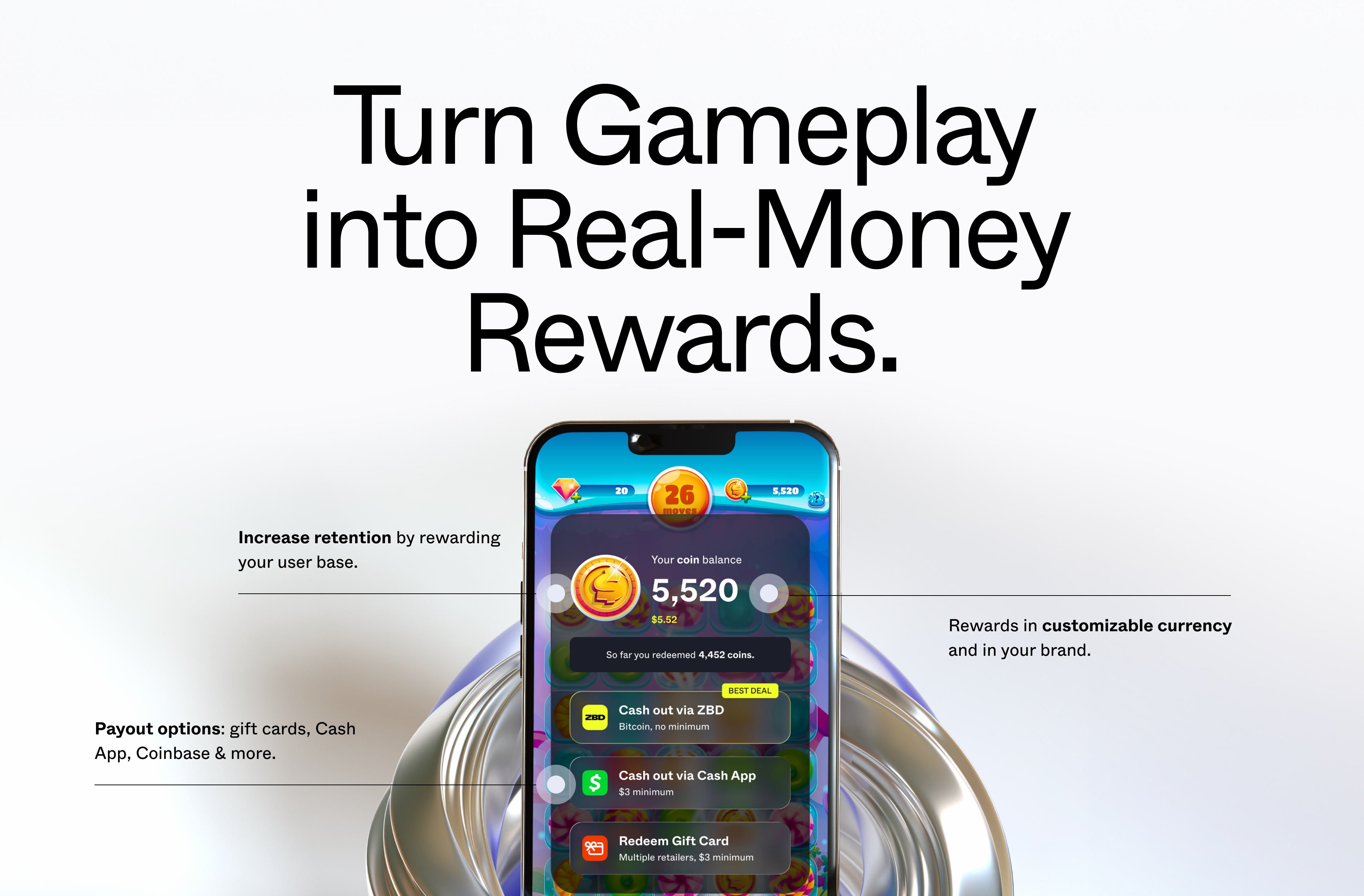 The ZBD Earn SDK lets you reward players with real money at meaningful moments in your mobile game (level completions, daily missions, milestone unlocks). Done well, it lifts retention and LTV by making progress feel tangible.
Unlike third-party rewards networks, rewards live natively inside your game — branded to your experience, triggered by your gameplay moments, and controlled entirely by you. Players never leave your app to collect rewards from an aggregator. The habit loop stays yours.
You control when rewards fire and how much players can earn. ZBD handles account creation, identity verification, and payouts through an in-app modal that requires no UI work on your end.
Drop a prefab into your scene. No backend required.
Reward players in your own virtual currency units or in satoshis. Most studios use the in-game currency model.
Players cash out through the ZBD modal. You open it with one method call; ZBD handles the rest.
Average revenue per daily active user increase seen by ZBD partners.
Long-term retention lift seen by partners with well-integrated reward economies.
Typical reward budget. Reinvesting a slice of revenue generates significantly more in return.
## How it works
Players accumulate a **rewards balance** at triggers you define. The balance is denominated in your chosen reward currency: virtual units in in-game currency mode, or satoshis in Bitcoin mode. When players are ready to cash out, they tap the rewards entry point in your game, link their account, and withdraw. ZBD handles the rest.
Two values govern every player's rewards state:
| Value | What it is |
| -------------------- | ------------------------------------------------------------------------------------------------------------------------------------------------------- |
| **Rewards balance** | The total amount the player has earned and not yet withdrawn. You add to this by calling `SendReward`. |
| **Withdrawal limit** | The maximum the player can withdraw in a 24-hour window. This accrues automatically based on time played, and can be set or increased from your server. |
The withdrawal limit exists to protect against fraud. A player can earn more than their daily limit; the excess stays in their balance and becomes withdrawable as the limit resets or is raised.
You set the reward amounts and configure the withdrawal limits. ZBD enforces those limits on the player side. This separation means you can be generous with rewards without taking on uncapped financial exposure.
## The player experience
Here's what a player sees from first launch through first cashout — the journey you're building toward.
From their first session, the player sees a balance counter in your game UI alongside your other currencies. It's branded to your game — they have no idea what's powering it. The counter starts at zero.
At a gameplay moment you define (level complete, daily mission chest, milestone hit), a reward notification fires: "You earned 500 coins!" The balance updates. They didn't have to do anything differently — it just happened.
Curiosity or intent: they tap the counter (or your rewards button). The modal opens instantly — no extra screens. They see their current balance and available cashout options.
First time only. The player creates a ZBD account — this is where they encounter the ZBD brand, briefly, to complete identity verification for cashout. After linking, the modal goes straight to their balance in future sessions. Your game's branding is front and center throughout; ZBD appears only at this cashout step.
They choose a payout method — bank transfer, gift card, Bitcoin, or another available option — and initiate a withdrawal. The modal handles the full flow. They're deep-linked back to your game when done.
The withdrawal limit resets daily. Any balance above the limit carries forward. The habit loop is set: play, earn, come back.
For guidance on what to say to players at each of these moments, see the [Player Communication Guide](/earn/sdk/player-comms).
## Key decisions
Before writing any code, you'll need to choose your reward currency (in-game units or Bitcoin), your delivery method (client-side or server-side), and confirm your target regions are covered. These decisions shape your integration.
Reward currency, delivery method, and payout options — with a comparison table for each. Read this before starting the setup.
## How the economics work
The reward budget comes from you — typically a small percentage of the revenue your players are already generating. You're not buying ad impressions or paying for external traffic. You're redirecting a portion of existing player LTV back to the players who generate it, at a fraction of what acquisition channels cost.
ZBD's platform fees are low, and the total cost of running a rewards program is designed to be well within the value it returns in retention and engagement. Your Customer Success Manager will walk you through the specifics when you get set up.
## Compliance and KYC
Payments involve compliance requirements. Here's what falls on ZBD and what falls on you.
**ZBD handles:**
* Player identity verification — players go through a light KYC step the first time they cash out, inside the ZBD modal. You don't build or manage this.
* Regulatory compliance — ZBD is a licensed payment service provider in the US and EU.
* Fraud tooling — withdrawal limits, device attestation, geolocation, and VPN detection are built into the SDK.
**You are responsible for:**
* Your reward exposure — you set the budget and limits. ZBD's built-in protections reduce fraud risk, but you ultimately own your reward economics. Moving to [server-side reward delivery](/earn/sdk/send-rewards-server) is the most effective step you can take. See [Security](/earn/sdk/security) for the full picture.
* App store compliance — ZBD rewards must be implemented correctly to comply with Apple App Store and Google Play policies. See [iOS App Store Guidelines](/earn/sdk/ios-app-store) and [Android App Store Guidelines](/earn/sdk/android-app-store).
* How you communicate rewards to players — see the [Player Communication Guide](/earn/sdk/player-comms) for what to say and what to avoid.
You do not take on KYC obligations for your players. ZBD holds that relationship.
## Before you start
A few decisions should be locked in before you write any code. The reward budget, daily withdrawal limit, and reward currency are all tunable after launch, but getting them roughly right at the start saves significant iteration.
Recommended starting values for reward budget, withdrawal limits, and trigger ceilings. Start here.
What you need to know to pass App Store and Google Play review with ZBD integrated.
## Get started
ZBD Earn is available to approved partners. [Talk to our team](https://zbdpay.com/contact) to discuss your use case and get access to the Unity SDK. Most studios are set up within a few days.
Lock in your reward budget, withdrawal limit, and reward currency before integrating. [Reward Economics →](/earn/sdk/reward-economics)
Your ZBD Customer Success Manager will provide the Unity package and help configure your project. [Download →](/earn/sdk/download)
Import the package, drop the prefab, and call `Init` on app launch. [Integration guide →](/earn/sdk/integration)
Call `SendReward` at a gameplay moment. [Client-side →](/earn/sdk/send-rewards-client) or [Server-side →](/earn/sdk/send-rewards-server)
Run through the go-live checklist before pushing to production. [Go-live checklist →](/earn/sdk/go-live-checklist)
The ZBD Earn SDK lets you reward players with real money at meaningful moments in your mobile game (level completions, daily missions, milestone unlocks). Done well, it lifts retention and LTV by making progress feel tangible.
Unlike third-party rewards networks, rewards live natively inside your game — branded to your experience, triggered by your gameplay moments, and controlled entirely by you. Players never leave your app to collect rewards from an aggregator. The habit loop stays yours.
You control when rewards fire and how much players can earn. ZBD handles account creation, identity verification, and payouts through an in-app modal that requires no UI work on your end.
Drop a prefab into your scene. No backend required.
Reward players in your own virtual currency units or in satoshis. Most studios use the in-game currency model.
Players cash out through the ZBD modal. You open it with one method call; ZBD handles the rest.
Average revenue per daily active user increase seen by ZBD partners.
Long-term retention lift seen by partners with well-integrated reward economies.
Typical reward budget. Reinvesting a slice of revenue generates significantly more in return.
## How it works
Players accumulate a **rewards balance** at triggers you define. The balance is denominated in your chosen reward currency: virtual units in in-game currency mode, or satoshis in Bitcoin mode. When players are ready to cash out, they tap the rewards entry point in your game, link their account, and withdraw. ZBD handles the rest.
Two values govern every player's rewards state:
| Value | What it is |
| -------------------- | ------------------------------------------------------------------------------------------------------------------------------------------------------- |
| **Rewards balance** | The total amount the player has earned and not yet withdrawn. You add to this by calling `SendReward`. |
| **Withdrawal limit** | The maximum the player can withdraw in a 24-hour window. This accrues automatically based on time played, and can be set or increased from your server. |
The withdrawal limit exists to protect against fraud. A player can earn more than their daily limit; the excess stays in their balance and becomes withdrawable as the limit resets or is raised.
You set the reward amounts and configure the withdrawal limits. ZBD enforces those limits on the player side. This separation means you can be generous with rewards without taking on uncapped financial exposure.
## The player experience
Here's what a player sees from first launch through first cashout — the journey you're building toward.
From their first session, the player sees a balance counter in your game UI alongside your other currencies. It's branded to your game — they have no idea what's powering it. The counter starts at zero.
At a gameplay moment you define (level complete, daily mission chest, milestone hit), a reward notification fires: "You earned 500 coins!" The balance updates. They didn't have to do anything differently — it just happened.
Curiosity or intent: they tap the counter (or your rewards button). The modal opens instantly — no extra screens. They see their current balance and available cashout options.
First time only. The player creates a ZBD account — this is where they encounter the ZBD brand, briefly, to complete identity verification for cashout. After linking, the modal goes straight to their balance in future sessions. Your game's branding is front and center throughout; ZBD appears only at this cashout step.
They choose a payout method — bank transfer, gift card, Bitcoin, or another available option — and initiate a withdrawal. The modal handles the full flow. They're deep-linked back to your game when done.
The withdrawal limit resets daily. Any balance above the limit carries forward. The habit loop is set: play, earn, come back.
For guidance on what to say to players at each of these moments, see the [Player Communication Guide](/earn/sdk/player-comms).
## Key decisions
Before writing any code, you'll need to choose your reward currency (in-game units or Bitcoin), your delivery method (client-side or server-side), and confirm your target regions are covered. These decisions shape your integration.
Reward currency, delivery method, and payout options — with a comparison table for each. Read this before starting the setup.
## How the economics work
The reward budget comes from you — typically a small percentage of the revenue your players are already generating. You're not buying ad impressions or paying for external traffic. You're redirecting a portion of existing player LTV back to the players who generate it, at a fraction of what acquisition channels cost.
ZBD's platform fees are low, and the total cost of running a rewards program is designed to be well within the value it returns in retention and engagement. Your Customer Success Manager will walk you through the specifics when you get set up.
## Compliance and KYC
Payments involve compliance requirements. Here's what falls on ZBD and what falls on you.
**ZBD handles:**
* Player identity verification — players go through a light KYC step the first time they cash out, inside the ZBD modal. You don't build or manage this.
* Regulatory compliance — ZBD is a licensed payment service provider in the US and EU.
* Fraud tooling — withdrawal limits, device attestation, geolocation, and VPN detection are built into the SDK.
**You are responsible for:**
* Your reward exposure — you set the budget and limits. ZBD's built-in protections reduce fraud risk, but you ultimately own your reward economics. Moving to [server-side reward delivery](/earn/sdk/send-rewards-server) is the most effective step you can take. See [Security](/earn/sdk/security) for the full picture.
* App store compliance — ZBD rewards must be implemented correctly to comply with Apple App Store and Google Play policies. See [iOS App Store Guidelines](/earn/sdk/ios-app-store) and [Android App Store Guidelines](/earn/sdk/android-app-store).
* How you communicate rewards to players — see the [Player Communication Guide](/earn/sdk/player-comms) for what to say and what to avoid.
You do not take on KYC obligations for your players. ZBD holds that relationship.
## Before you start
A few decisions should be locked in before you write any code. The reward budget, daily withdrawal limit, and reward currency are all tunable after launch, but getting them roughly right at the start saves significant iteration.
Recommended starting values for reward budget, withdrawal limits, and trigger ceilings. Start here.
What you need to know to pass App Store and Google Play review with ZBD integrated.
## Get started
ZBD Earn is available to approved partners. [Talk to our team](https://zbdpay.com/contact) to discuss your use case and get access to the Unity SDK. Most studios are set up within a few days.
Lock in your reward budget, withdrawal limit, and reward currency before integrating. [Reward Economics →](/earn/sdk/reward-economics)
Your ZBD Customer Success Manager will provide the Unity package and help configure your project. [Download →](/earn/sdk/download)
Import the package, drop the prefab, and call `Init` on app launch. [Integration guide →](/earn/sdk/integration)
Call `SendReward` at a gameplay moment. [Client-side →](/earn/sdk/send-rewards-client) or [Server-side →](/earn/sdk/send-rewards-server)
Run through the go-live checklist before pushing to production. [Go-live checklist →](/earn/sdk/go-live-checklist)