> ## Documentation Index
> Fetch the complete documentation index at: https://docs.zbdpay.com/llms.txt
> Use this file to discover all available pages before exploring further.
# Local Notifications
> Bring players back to keep earning or claim their rewards, with SDK-scheduled local reminders — no push infrastructure required.
A player who leaves with an unclaimed balance is the easiest player to win back. Local reminders let you reach them — *"you have rewards to claim"*, *"you're 80% of the way to an Amazon card"* — without any push infrastructure.
Because the OS holds the scheduled notification, there is **no server, no device tokens, and no backend work**. The SDK schedules reminders when the player leaves and cancels them when they return, so a reminder only ever fires if they genuinely stayed away.
**You supply the conditions and the copy; the SDK owns the plumbing.** It caches the player's reward state during play, schedules on background, cancels on return, and handles the platform hygiene that makes local notifications fiddly to get right.
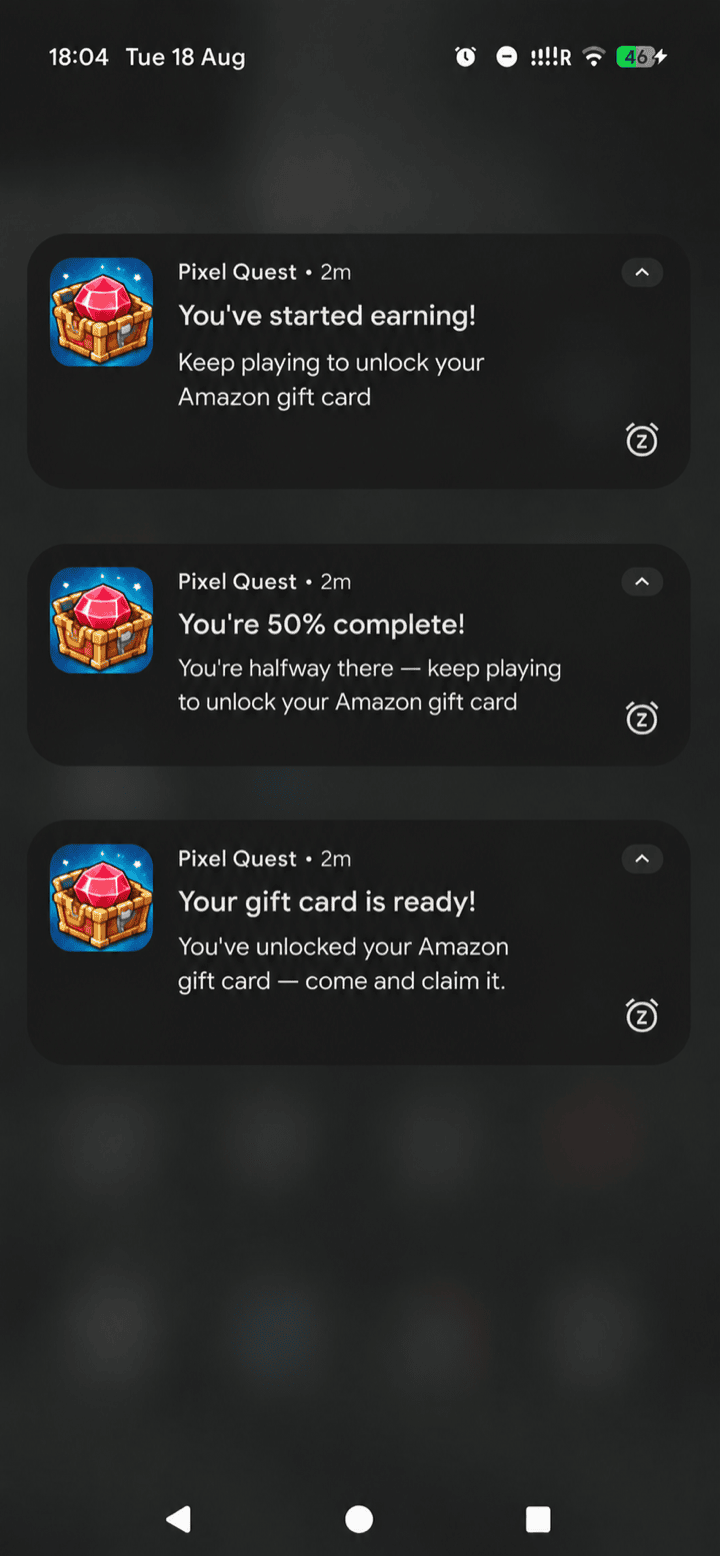 Requires Unity SDK v1.1.7 or above.
## Opting in
**Already have a notification system? Use that instead.** This feature exists to make reminders easier and quicker to ship for games that don't have anything built. If your game already schedules its own notifications, we recommend adding reward reminders there — pull the reward data from [`GetGiftCards`](/embedded-rewards/gift-cards) or [`GetBalance`](/embedded-rewards/user-balance) — and skipping this feature entirely.
Reminders are **off by default** and stay off until you do both of the following:
1. **Add Unity's Mobile Notifications package** (`com.unity.mobile.notifications`, version 2.3.0 or above) to your project. The SDK does not add it for you.
2. **Call `ConfigureReminders`** with your rules.
If you skip either, nothing happens — no notification channel is registered, no permission is requested, nothing is scheduled, and there are **no build errors**. Without the package, `ConfigureReminders` logs a hint and does nothing. A game using its own notification manager can ignore this feature completely, even with the package installed.
## Quick start
Call once, any time after `Init`. Your rules depend on which cashout options your game offers — gift cards have a minimum to reach, while Cash App and ZBD don't, so the milestones differ:
Gift cards have a fixed price, so `giftCardPercent` gives you a concrete goal to aim the player at — the strongest motivator you have.
```csharp theme={null}
ZBDController.Instance.ConfigureReminders(new ZBDReminderConfig
{
currencyLabel = "coins", // whatever your players call it
defaultSchedule = new[] { 24f, 72f, 168f }, // hours after they leave: 1 day, 3 days, 1 week
rules = new[]
{
// Unlocked something concrete — chase sooner, they can claim right now
new ZBDReminderRule
{
when = s => s.giftCardPercent >= 100f,
title = "Your gift card is ready",
body = "You've unlocked a {card} gift card — come and claim it.",
schedule = new[] { 6f, 24f }, // per-rule override of defaultSchedule
},
// A concrete goal beats a bare number
new ZBDReminderRule
{
when = s => s.giftCardPercent >= 50f,
title = "Almost there!",
body = "You're {percent}% of the way to a {card} gift card.",
},
new ZBDReminderRule
{
when = s => s.balance > 0,
title = "You have rewards to claim",
body = "You've got {balance} {currency} waiting — come and claim them.",
},
}
});
```
Cash App has **no minimum cashout**, so there's no gift-card goal to progress toward. Use a balance threshold instead: we recommend around **\$1 worth** before you tell a player they can cash out — enough to feel worth claiming.
```csharp theme={null}
// $1 worth of your currency. At the recommended $0.0001 per unit that's
// 10,000 units — set this from your own exchange rate.
const int CashoutThreshold = 10000;
ZBDController.Instance.ConfigureReminders(new ZBDReminderConfig
{
currencyLabel = "coins",
defaultSchedule = new[] { 24f, 72f, 168f },
rules = new[]
{
// Enough to be worth cashing out — chase sooner
new ZBDReminderRule
{
when = s => s.balance >= CashoutThreshold,
title = "You can cash out",
body = "You've earned {balance} {currency} — cash out to Cash App.",
schedule = new[] { 6f, 24f },
},
// Earning, but not there yet — reinforce that it's real
new ZBDReminderRule
{
when = s => s.balance > 0,
title = "You're earning",
body = "You've got {balance} {currency} so far. Keep playing to cash out.",
},
}
});
```
ZBD cashout has **no minimum**, so the same two-step model as Cash App applies: tell the player they're earning, then tell them once there's enough to be worth claiming (**\$1 worth** is a good threshold).
```csharp theme={null}
// $1 worth of your currency. At the recommended $0.0001 per unit that's
// 10,000 units — set this from your own exchange rate.
const int CashoutThreshold = 10000;
ZBDController.Instance.ConfigureReminders(new ZBDReminderConfig
{
currencyLabel = "coins",
defaultSchedule = new[] { 24f, 72f, 168f },
rules = new[]
{
new ZBDReminderRule
{
when = s => s.balance >= CashoutThreshold,
title = "You can cash out",
body = "You've earned {balance} {currency} — come and claim it.",
schedule = new[] { 6f, 24f },
},
new ZBDReminderRule
{
when = s => s.balance > 0,
title = "You're earning",
body = "You've got {balance} {currency} so far. Keep playing to cash out.",
},
}
});
```
Offering several cashout options? Combine the rules in one config — put the gift-card rules first (a named card is the stronger pull) and let the balance-threshold rules catch everyone else. First match wins, so order them most specific to least.
Then ask for permission at a sensible moment (see [Asking for permission](#asking-for-permission)):
```csharp theme={null}
ZBDController.Instance.RequestNotificationPermission();
```
## How rules work
When the player backgrounds the app, the SDK evaluates your rules **in order** against a snapshot of the player's reward state. The **first match wins** and its reminders are scheduled; if **no rule matches, nothing is scheduled**. List the most specific rule first.
**Never tell a player who has nothing waiting that rewards are waiting for them.** Gate any "you have rewards to claim" rule on `s.balance > 0` — no-match-means-no-reminder is how a player who already cashed out stays unbothered. The one exception is a deliberate win-back rule that *invites* a lapsed player to earn again rather than claiming they have earnings; see [Winning back lapsed players](#winning-back-lapsed-players).
Each rule has:
| Field | What it does |
| - | - |
| `when` | A predicate deciding whether the rule applies. Runs as the app suspends, so it must be a cheap in-memory check — no network calls. |
| `title` / `body` | The notification copy. Both support tokens: `{balance}`, `{currency}`, `{card}`, and `{percent}`, substituted from the snapshot. |
| `bodyFor` | Optional. Builds the body from arbitrary state when the tokens can't express it. Takes precedence over `body`. |
| `schedule` | Optional per-rule timings (hours after leaving). Falls back to the config's `defaultSchedule`. |
### The snapshot
Rules receive a `ZBDRewardSnapshot` with the player's withdrawable `balance`, the `giftCardName` they're closest to unlocking, their `giftCardPercent` progress toward it (0–100, or -1 when unknown), and `canWithdraw`.
The snapshot is **as of the player's last session, not a live read** — reminders are scheduled while the app is suspending, which is not a safe place for network calls, so the SDK caches this during play: after `Init`, after each reward it sends, and after every withdrawal. You never refresh it yourself.
## Winning back lapsed players
Because the SDK cancels every pending reminder the moment a player returns, **a long-dated schedule entry can only ever reach someone who genuinely stayed away that long**. That's the mechanism for lapsed-player win-back: extend the schedule rather than trying to detect absence yourself.
```csharp theme={null}
ZBDController.Instance.ConfigureReminders(new ZBDReminderConfig
{
currencyLabel = "coins",
// 1 day, 3 days, 1 week, 2 weeks, 30 days — the last two only ever
// reach players who never came back
defaultSchedule = new[] { 24f, 72f, 168f, 336f, 720f },
rules = new[]
{
// Has something waiting: name the payouts, not just the balance
new ZBDReminderRule
{
when = s => s.balance > 0,
title = "Your rewards are waiting",
body = "You've got {balance} {currency} to claim — cash out to a gift card, Cash App and more.",
},
// Cashed out and drifted away: nothing waiting, so invite them to earn again
new ZBDReminderRule
{
when = s => s.balance == 0,
title = "Come back and earn",
body = "Keep playing to earn real rewards — gift cards, Cash App and more.",
schedule = new[] { 336f, 720f }, // lapsed-only: don't nag a fresh player
},
}
});
```
**One rule sends one message, repeated at each of its schedule entries.** The title and body are built once from the matching rule, so a reminder at 30 days says exactly what the reminder at 1 day said. Write copy that reads well at any distance — *"your rewards are waiting"* works at both; *"you just earned!"* does not.
If you need genuinely different copy at day 1 versus week 4, use your own notification system and schedule the messages yourself.
The zero-balance rule above is the **one** case where a reminder to a player with nothing waiting is appropriate — because it invites them to earn rather than claiming they have earnings. Keep that distinction: never tell a player who cashed out that rewards are waiting for them. Give it a lapsed-only schedule so a player who simply hasn't earned yet in their first session isn't nagged the next day.
## What the SDK handles for you
* **Scheduling on background, cancelling on return** — using `OnApplicationPause`, which fires reliably on both platforms (unlike `OnApplicationQuit`, which Android frequently skips when killing a backgrounded process).
* **Only its own notifications.** Cancellation is scoped to reminders the SDK scheduled, tracked by ID and persisted across process kills. Your game's own scheduled notifications are never touched.
* **The Android notification channel** (required on API 26+), configurable via `androidChannelId` / `androidChannelName` / `androidChannelDescription` on the config.
* **Platform hygiene** — a 60-second floor (both platforms batch shorter timers), and reminders never show while the player is in the foreground of your game.
* **Stale-state protection** — pending reminders are cancelled and rebuilt on every background, and the snapshot is re-cached after withdrawals so copy is never built from pre-cashout state.
## Asking for permission
**Never ask on a cold launch.** iOS shows the system permission prompt only once per install — if the player declines, the only way back is the Settings app. The SDK never requests permission itself; you choose the moment.
Call `RequestNotificationPermission()` when the value is obvious to the player — after their first reward, or once they're a signed-in rewards user. It only ever prompts once per install.
On **Android 13 (API 33) and above** the `POST_NOTIFICATIONS` runtime permission is required — without it nothing is shown and nothing errors. The same call handles it.
## Cancelling programmatically
```csharp theme={null}
ZBDController.Instance.CancelReminders();
```
Cancels the SDK's own pending reminders — for example if the player turns reminders off in your settings menu. Your game's notifications are unaffected.
## Testing
Notifications are **device-only** — they don't fire in the Unity Editor.
To test without waiting a day, set `debugFastReminders = true` on the config: reminders fire about a minute after backgrounding instead of hours (interval tunable via `debugIntervalSeconds`, floored at 60 seconds).
Never ship with `debugFastReminders` enabled.
## Reference example
The SDK demo project's `ZBDDemoNotifications.cs` is a complete working example of configuring reminders — rules, permission timing, and the debug flag — and is a good starting point to copy from.
## Pairing with creatives
Local reminders bring the player back; a [creative modal](/embedded-rewards/creatives) tells them what to do next. Showing a *"you're halfway to a gift card"* creative on the session that a reminder brought them back to is a natural pairing — both are driven by the same gift-card progress data.
This documentation is built and hosted on [Mintlify](https://mintlify.com), a developer documentation platform.
Requires Unity SDK v1.1.7 or above.
## Opting in
**Already have a notification system? Use that instead.** This feature exists to make reminders easier and quicker to ship for games that don't have anything built. If your game already schedules its own notifications, we recommend adding reward reminders there — pull the reward data from [`GetGiftCards`](/embedded-rewards/gift-cards) or [`GetBalance`](/embedded-rewards/user-balance) — and skipping this feature entirely.
Reminders are **off by default** and stay off until you do both of the following:
1. **Add Unity's Mobile Notifications package** (`com.unity.mobile.notifications`, version 2.3.0 or above) to your project. The SDK does not add it for you.
2. **Call `ConfigureReminders`** with your rules.
If you skip either, nothing happens — no notification channel is registered, no permission is requested, nothing is scheduled, and there are **no build errors**. Without the package, `ConfigureReminders` logs a hint and does nothing. A game using its own notification manager can ignore this feature completely, even with the package installed.
## Quick start
Call once, any time after `Init`. Your rules depend on which cashout options your game offers — gift cards have a minimum to reach, while Cash App and ZBD don't, so the milestones differ:
Gift cards have a fixed price, so `giftCardPercent` gives you a concrete goal to aim the player at — the strongest motivator you have.
```csharp theme={null}
ZBDController.Instance.ConfigureReminders(new ZBDReminderConfig
{
currencyLabel = "coins", // whatever your players call it
defaultSchedule = new[] { 24f, 72f, 168f }, // hours after they leave: 1 day, 3 days, 1 week
rules = new[]
{
// Unlocked something concrete — chase sooner, they can claim right now
new ZBDReminderRule
{
when = s => s.giftCardPercent >= 100f,
title = "Your gift card is ready",
body = "You've unlocked a {card} gift card — come and claim it.",
schedule = new[] { 6f, 24f }, // per-rule override of defaultSchedule
},
// A concrete goal beats a bare number
new ZBDReminderRule
{
when = s => s.giftCardPercent >= 50f,
title = "Almost there!",
body = "You're {percent}% of the way to a {card} gift card.",
},
new ZBDReminderRule
{
when = s => s.balance > 0,
title = "You have rewards to claim",
body = "You've got {balance} {currency} waiting — come and claim them.",
},
}
});
```
Cash App has **no minimum cashout**, so there's no gift-card goal to progress toward. Use a balance threshold instead: we recommend around **\$1 worth** before you tell a player they can cash out — enough to feel worth claiming.
```csharp theme={null}
// $1 worth of your currency. At the recommended $0.0001 per unit that's
// 10,000 units — set this from your own exchange rate.
const int CashoutThreshold = 10000;
ZBDController.Instance.ConfigureReminders(new ZBDReminderConfig
{
currencyLabel = "coins",
defaultSchedule = new[] { 24f, 72f, 168f },
rules = new[]
{
// Enough to be worth cashing out — chase sooner
new ZBDReminderRule
{
when = s => s.balance >= CashoutThreshold,
title = "You can cash out",
body = "You've earned {balance} {currency} — cash out to Cash App.",
schedule = new[] { 6f, 24f },
},
// Earning, but not there yet — reinforce that it's real
new ZBDReminderRule
{
when = s => s.balance > 0,
title = "You're earning",
body = "You've got {balance} {currency} so far. Keep playing to cash out.",
},
}
});
```
ZBD cashout has **no minimum**, so the same two-step model as Cash App applies: tell the player they're earning, then tell them once there's enough to be worth claiming (**\$1 worth** is a good threshold).
```csharp theme={null}
// $1 worth of your currency. At the recommended $0.0001 per unit that's
// 10,000 units — set this from your own exchange rate.
const int CashoutThreshold = 10000;
ZBDController.Instance.ConfigureReminders(new ZBDReminderConfig
{
currencyLabel = "coins",
defaultSchedule = new[] { 24f, 72f, 168f },
rules = new[]
{
new ZBDReminderRule
{
when = s => s.balance >= CashoutThreshold,
title = "You can cash out",
body = "You've earned {balance} {currency} — come and claim it.",
schedule = new[] { 6f, 24f },
},
new ZBDReminderRule
{
when = s => s.balance > 0,
title = "You're earning",
body = "You've got {balance} {currency} so far. Keep playing to cash out.",
},
}
});
```
Offering several cashout options? Combine the rules in one config — put the gift-card rules first (a named card is the stronger pull) and let the balance-threshold rules catch everyone else. First match wins, so order them most specific to least.
Then ask for permission at a sensible moment (see [Asking for permission](#asking-for-permission)):
```csharp theme={null}
ZBDController.Instance.RequestNotificationPermission();
```
## How rules work
When the player backgrounds the app, the SDK evaluates your rules **in order** against a snapshot of the player's reward state. The **first match wins** and its reminders are scheduled; if **no rule matches, nothing is scheduled**. List the most specific rule first.
**Never tell a player who has nothing waiting that rewards are waiting for them.** Gate any "you have rewards to claim" rule on `s.balance > 0` — no-match-means-no-reminder is how a player who already cashed out stays unbothered. The one exception is a deliberate win-back rule that *invites* a lapsed player to earn again rather than claiming they have earnings; see [Winning back lapsed players](#winning-back-lapsed-players).
Each rule has:
| Field | What it does |
| - | - |
| `when` | A predicate deciding whether the rule applies. Runs as the app suspends, so it must be a cheap in-memory check — no network calls. |
| `title` / `body` | The notification copy. Both support tokens: `{balance}`, `{currency}`, `{card}`, and `{percent}`, substituted from the snapshot. |
| `bodyFor` | Optional. Builds the body from arbitrary state when the tokens can't express it. Takes precedence over `body`. |
| `schedule` | Optional per-rule timings (hours after leaving). Falls back to the config's `defaultSchedule`. |
### The snapshot
Rules receive a `ZBDRewardSnapshot` with the player's withdrawable `balance`, the `giftCardName` they're closest to unlocking, their `giftCardPercent` progress toward it (0–100, or -1 when unknown), and `canWithdraw`.
The snapshot is **as of the player's last session, not a live read** — reminders are scheduled while the app is suspending, which is not a safe place for network calls, so the SDK caches this during play: after `Init`, after each reward it sends, and after every withdrawal. You never refresh it yourself.
## Winning back lapsed players
Because the SDK cancels every pending reminder the moment a player returns, **a long-dated schedule entry can only ever reach someone who genuinely stayed away that long**. That's the mechanism for lapsed-player win-back: extend the schedule rather than trying to detect absence yourself.
```csharp theme={null}
ZBDController.Instance.ConfigureReminders(new ZBDReminderConfig
{
currencyLabel = "coins",
// 1 day, 3 days, 1 week, 2 weeks, 30 days — the last two only ever
// reach players who never came back
defaultSchedule = new[] { 24f, 72f, 168f, 336f, 720f },
rules = new[]
{
// Has something waiting: name the payouts, not just the balance
new ZBDReminderRule
{
when = s => s.balance > 0,
title = "Your rewards are waiting",
body = "You've got {balance} {currency} to claim — cash out to a gift card, Cash App and more.",
},
// Cashed out and drifted away: nothing waiting, so invite them to earn again
new ZBDReminderRule
{
when = s => s.balance == 0,
title = "Come back and earn",
body = "Keep playing to earn real rewards — gift cards, Cash App and more.",
schedule = new[] { 336f, 720f }, // lapsed-only: don't nag a fresh player
},
}
});
```
**One rule sends one message, repeated at each of its schedule entries.** The title and body are built once from the matching rule, so a reminder at 30 days says exactly what the reminder at 1 day said. Write copy that reads well at any distance — *"your rewards are waiting"* works at both; *"you just earned!"* does not.
If you need genuinely different copy at day 1 versus week 4, use your own notification system and schedule the messages yourself.
The zero-balance rule above is the **one** case where a reminder to a player with nothing waiting is appropriate — because it invites them to earn rather than claiming they have earnings. Keep that distinction: never tell a player who cashed out that rewards are waiting for them. Give it a lapsed-only schedule so a player who simply hasn't earned yet in their first session isn't nagged the next day.
## What the SDK handles for you
* **Scheduling on background, cancelling on return** — using `OnApplicationPause`, which fires reliably on both platforms (unlike `OnApplicationQuit`, which Android frequently skips when killing a backgrounded process).
* **Only its own notifications.** Cancellation is scoped to reminders the SDK scheduled, tracked by ID and persisted across process kills. Your game's own scheduled notifications are never touched.
* **The Android notification channel** (required on API 26+), configurable via `androidChannelId` / `androidChannelName` / `androidChannelDescription` on the config.
* **Platform hygiene** — a 60-second floor (both platforms batch shorter timers), and reminders never show while the player is in the foreground of your game.
* **Stale-state protection** — pending reminders are cancelled and rebuilt on every background, and the snapshot is re-cached after withdrawals so copy is never built from pre-cashout state.
## Asking for permission
**Never ask on a cold launch.** iOS shows the system permission prompt only once per install — if the player declines, the only way back is the Settings app. The SDK never requests permission itself; you choose the moment.
Call `RequestNotificationPermission()` when the value is obvious to the player — after their first reward, or once they're a signed-in rewards user. It only ever prompts once per install.
On **Android 13 (API 33) and above** the `POST_NOTIFICATIONS` runtime permission is required — without it nothing is shown and nothing errors. The same call handles it.
## Cancelling programmatically
```csharp theme={null}
ZBDController.Instance.CancelReminders();
```
Cancels the SDK's own pending reminders — for example if the player turns reminders off in your settings menu. Your game's notifications are unaffected.
## Testing
Notifications are **device-only** — they don't fire in the Unity Editor.
To test without waiting a day, set `debugFastReminders = true` on the config: reminders fire about a minute after backgrounding instead of hours (interval tunable via `debugIntervalSeconds`, floored at 60 seconds).
Never ship with `debugFastReminders` enabled.
## Reference example
The SDK demo project's `ZBDDemoNotifications.cs` is a complete working example of configuring reminders — rules, permission timing, and the debug flag — and is a good starting point to copy from.
## Pairing with creatives
Local reminders bring the player back; a [creative modal](/embedded-rewards/creatives) tells them what to do next. Showing a *"you're halfway to a gift card"* creative on the session that a reminder brought them back to is a natural pairing — both are driven by the same gift-card progress data.
This documentation is built and hosted on [Mintlify](https://mintlify.com), a developer documentation platform.