> ## Documentation Index
> Fetch the complete documentation index at: https://docs.zbdpay.com/llms.txt
> Use this file to discover all available pages before exploring further.
# API Keys
> Generate and secure your keys to unlock Lightning-fast payments
API keys are your passport to the ZBD platform. With a single key, you can send payments globally, create invoices, manage wallets, and build the future of digital payments.
**Security First** - API keys are server-side only and grant full access to your project's wallet. Never expose them in client-side code, mobile apps, or public repositories.
## Your First API Key
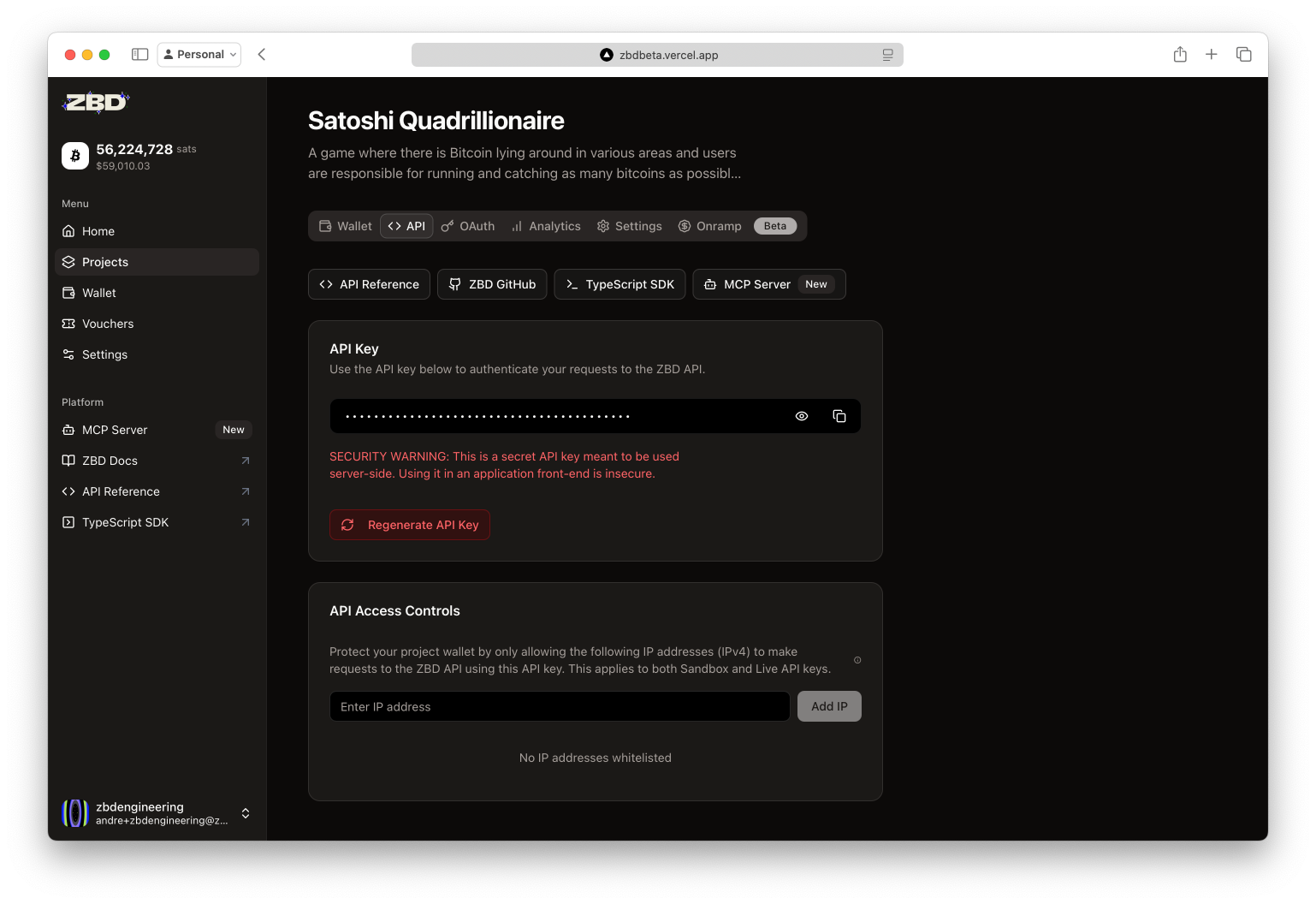
Navigate to your project's **API** tab to view and manage your API keys.
 ### What You Can Do With API Keys
Pay any Lightning Address or invoice instantly
Generate invoices and process incoming payments
Check balances and transaction history
Issue redeemable payment links
## Quick Start Example
Once you have your API key, you're ready to send your first payment:
```bash cURL theme={null}
curl -X POST https://api.zbdpay.com/v0/payments \
-H "apikey: YOUR_API_KEY" \
-H "Content-Type: application/json" \
-d '{
"amount": "1000",
"description": "First payment!",
"internalId": "test-001",
"callbackUrl": "https://myapp.com/webhook"
}'
```
```javascript Node.js theme={null}
const payment = await fetch('https://api.zbdpay.com/v0/payments', {
method: 'POST',
headers: {
'apikey': process.env.ZBD_API_KEY,
'Content-Type': 'application/json'
},
body: JSON.stringify({
amount: '1000',
description: 'First payment!',
internalId: 'test-001'
})
});
```
## Security Best Practices
### 🔐 Secure Storage
```bash theme={null}
# .env file (never commit this!)
ZBD_API_KEY=your_api_key_here
# Access in code
const apiKey = process.env.ZBD_API_KEY;
```
**Best for**: Local development and deployment platforms
Use dedicated secret management services:
* **AWS Secrets Manager**
* **Google Secret Manager**
* **HashiCorp Vault**
* **Azure Key Vault**
**Best for**: Production environments
Configure secrets in your deployment pipeline:
* **GitHub Actions**: Repository secrets
* **Vercel**: Environment variables
* **Heroku**: Config vars
* **Docker**: Build secrets
**Best for**: Automated deployments
### 🛡️ IP Allowlisting
Restrict API access to specific IP addresses for maximum security:
### What You Can Do With API Keys
Pay any Lightning Address or invoice instantly
Generate invoices and process incoming payments
Check balances and transaction history
Issue redeemable payment links
## Quick Start Example
Once you have your API key, you're ready to send your first payment:
```bash cURL theme={null}
curl -X POST https://api.zbdpay.com/v0/payments \
-H "apikey: YOUR_API_KEY" \
-H "Content-Type: application/json" \
-d '{
"amount": "1000",
"description": "First payment!",
"internalId": "test-001",
"callbackUrl": "https://myapp.com/webhook"
}'
```
```javascript Node.js theme={null}
const payment = await fetch('https://api.zbdpay.com/v0/payments', {
method: 'POST',
headers: {
'apikey': process.env.ZBD_API_KEY,
'Content-Type': 'application/json'
},
body: JSON.stringify({
amount: '1000',
description: 'First payment!',
internalId: 'test-001'
})
});
```
## Security Best Practices
### 🔐 Secure Storage
```bash theme={null}
# .env file (never commit this!)
ZBD_API_KEY=your_api_key_here
# Access in code
const apiKey = process.env.ZBD_API_KEY;
```
**Best for**: Local development and deployment platforms
Use dedicated secret management services:
* **AWS Secrets Manager**
* **Google Secret Manager**
* **HashiCorp Vault**
* **Azure Key Vault**
**Best for**: Production environments
Configure secrets in your deployment pipeline:
* **GitHub Actions**: Repository secrets
* **Vercel**: Environment variables
* **Heroku**: Config vars
* **Docker**: Build secrets
**Best for**: Automated deployments
### 🛡️ IP Allowlisting
Restrict API access to specific IP addresses for maximum security:
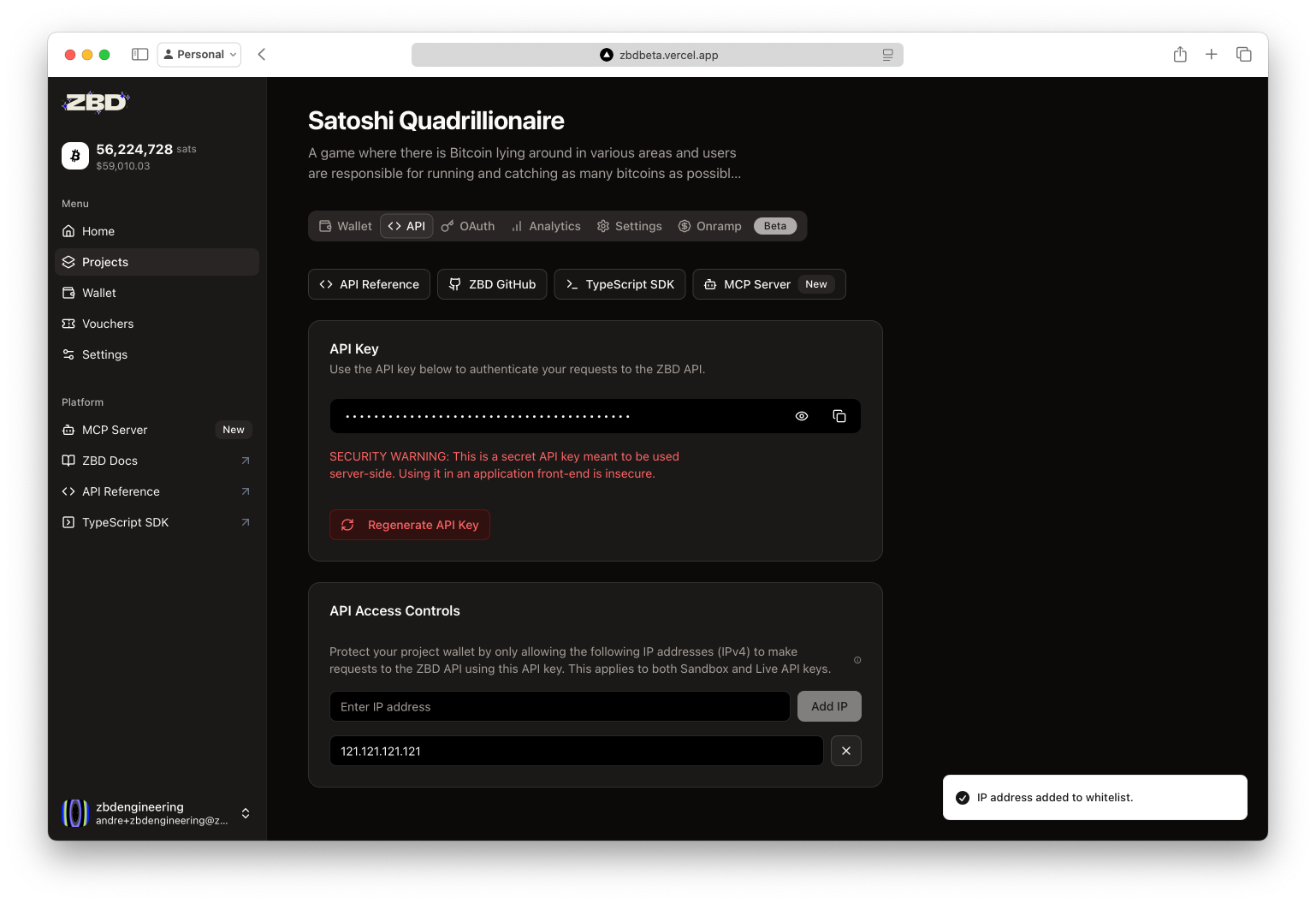 **How to Configure:**
1. Navigate to your project's API tab
2. Click "API Access Controls"
3. Add your server's IP addresses
4. Save changes
**Dynamic IPs?** If your infrastructure uses dynamic IPs (like serverless functions), consider using a proxy service with static IPs or contact our team for alternative security options.
## Key Rotation & Regeneration
Regular key rotation is a security best practice. Here's when and how to do it:
### When to Rotate Keys
* ⏰ **Scheduled**: Every 90 days as a best practice
* 🚨 **Immediately if**:
* Key exposed in client code
* Committed to version control
* Employee with access leaves
* Suspicious activity detected
### How to Regenerate
**How to Configure:**
1. Navigate to your project's API tab
2. Click "API Access Controls"
3. Add your server's IP addresses
4. Save changes
**Dynamic IPs?** If your infrastructure uses dynamic IPs (like serverless functions), consider using a proxy service with static IPs or contact our team for alternative security options.
## Key Rotation & Regeneration
Regular key rotation is a security best practice. Here's when and how to do it:
### When to Rotate Keys
* ⏰ **Scheduled**: Every 90 days as a best practice
* 🚨 **Immediately if**:
* Key exposed in client code
* Committed to version control
* Employee with access leaves
* Suspicious activity detected
### How to Regenerate
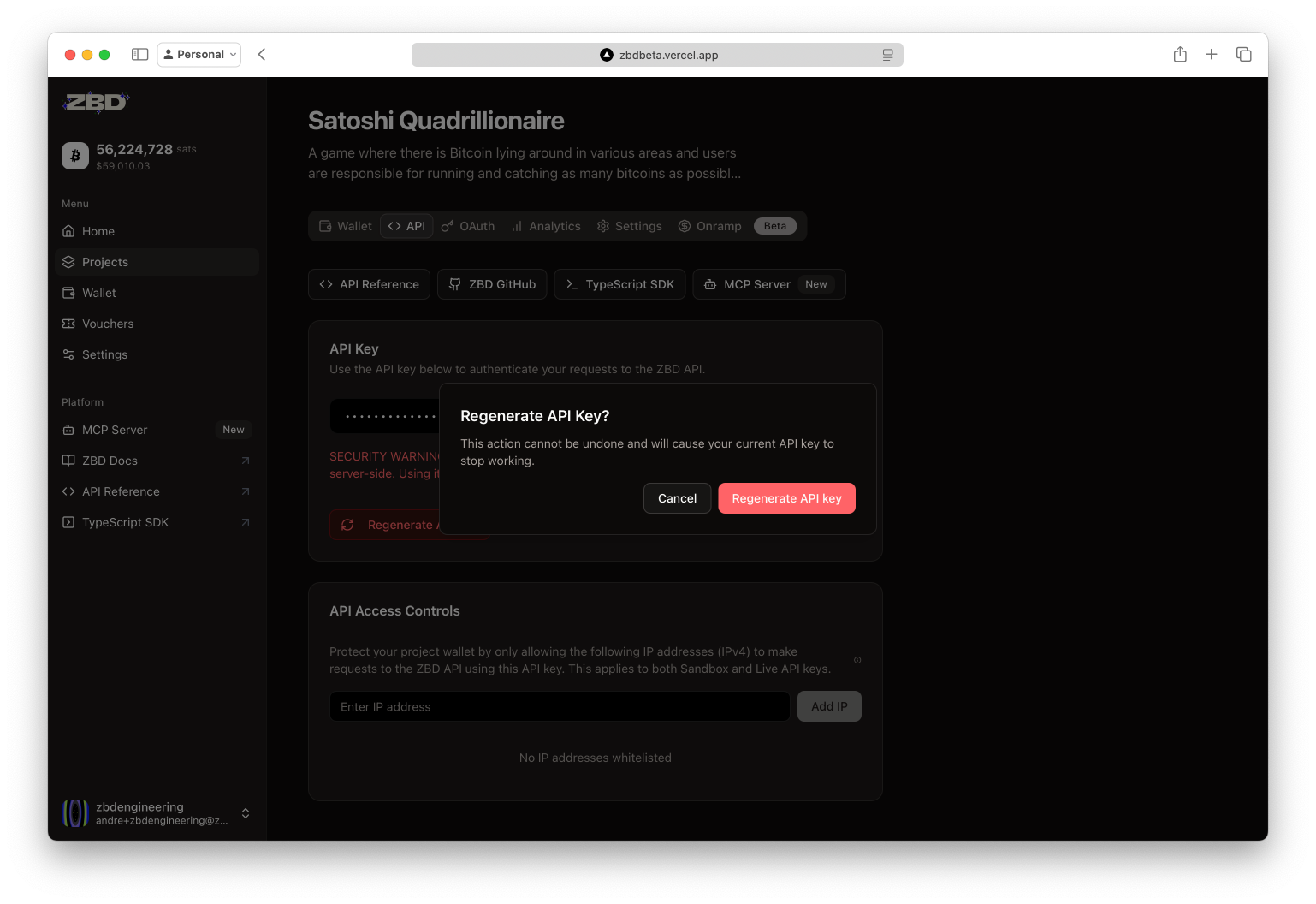 **Important**: Regenerating creates a new key and immediately disables the old one. Update your applications before regenerating to avoid downtime.
### Zero-Downtime Rotation Strategy
Schedule during low-traffic period
Test new key in staging environment
Update production with new key
Once deployed, regenerate in dashboard
Watch logs for any failed authentications
## API Key Permissions (Coming Soon)
**Scoped Permissions** - Soon you'll be able to create keys with limited permissions:
* Read-only keys for analytics
* Payment-only keys for point-of-sale
* Receive-only keys for donation pages
## Testing Your API Key
Use this simple test to verify your key is working:
```bash cURL theme={null}
curl https://api.zbdpay.com/v0/wallet \
-H "apikey: YOUR_API_KEY"
```
```javascript Node.js theme={null}
// Quick test script
const testApiKey = async () => {
const response = await fetch('https://api.zbdpay.com/v0/wallet', {
headers: { 'apikey': process.env.ZBD_API_KEY }
});
if (response.ok) {
console.log('✅ API key is valid!');
const wallet = await response.json();
console.log('Balance:', wallet.data.balance, 'sats');
} else {
console.error('❌ API key test failed:', response.status);
}
};
testApiKey();
```
## Ready to Build?
You now have everything needed to start integrating ZBD payments into your application.
Use our SDKs to send your first Lightning payment
Explore all available endpoints
**Important**: Regenerating creates a new key and immediately disables the old one. Update your applications before regenerating to avoid downtime.
### Zero-Downtime Rotation Strategy
Schedule during low-traffic period
Test new key in staging environment
Update production with new key
Once deployed, regenerate in dashboard
Watch logs for any failed authentications
## API Key Permissions (Coming Soon)
**Scoped Permissions** - Soon you'll be able to create keys with limited permissions:
* Read-only keys for analytics
* Payment-only keys for point-of-sale
* Receive-only keys for donation pages
## Testing Your API Key
Use this simple test to verify your key is working:
```bash cURL theme={null}
curl https://api.zbdpay.com/v0/wallet \
-H "apikey: YOUR_API_KEY"
```
```javascript Node.js theme={null}
// Quick test script
const testApiKey = async () => {
const response = await fetch('https://api.zbdpay.com/v0/wallet', {
headers: { 'apikey': process.env.ZBD_API_KEY }
});
if (response.ok) {
console.log('✅ API key is valid!');
const wallet = await response.json();
console.log('Balance:', wallet.data.balance, 'sats');
} else {
console.error('❌ API key test failed:', response.status);
}
};
testApiKey();
```
## Ready to Build?
You now have everything needed to start integrating ZBD payments into your application.
Use our SDKs to send your first Lightning payment
Explore all available endpoints