

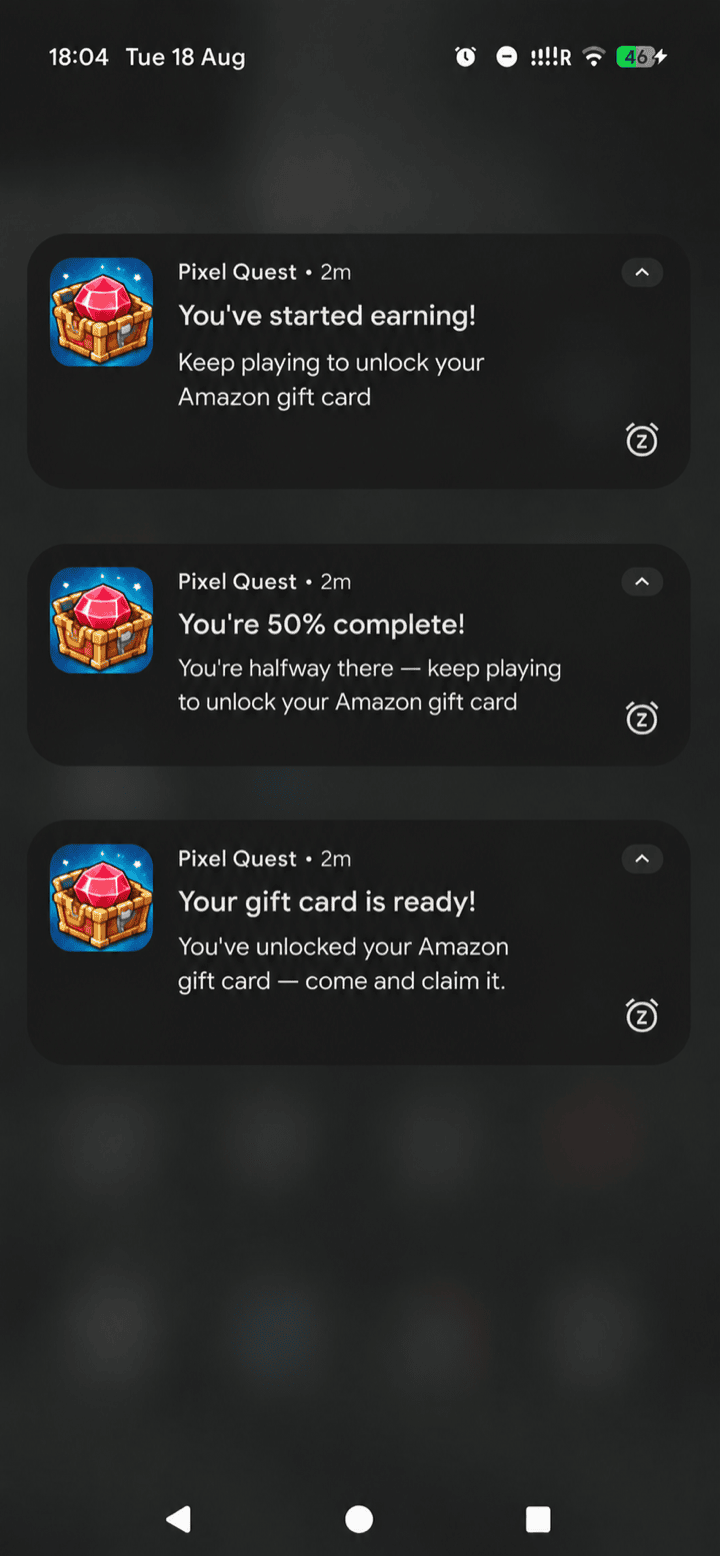
The gift-card rules from the Quick start, as a returning player sees them — progress toward the card, then a claim prompt once it unlocks.
Requires Unity SDK v1.1.7 or above.
Opting in
Already have a notification system? Use that instead. This feature exists to make reminders easier and quicker to ship for games that don’t have anything built. If your game already schedules its own notifications, we recommend adding reward reminders there — pull the reward data from
GetGiftCards or GetBalance — and skipping this feature entirely.- Add Unity’s Mobile Notifications package (
com.unity.mobile.notifications, version 2.3.0 or above) to your project. The SDK does not add it for you. - Call
ConfigureReminderswith your rules.
ConfigureReminders logs a hint and does nothing. A game using its own notification manager can ignore this feature completely, even with the package installed.
Quick start
Call once, any time afterInit. Your rules depend on which cashout options your game offers — gift cards have a minimum to reach, while Cash App and ZBD don’t, so the milestones differ:
- Gift cards
- Cash App
- ZBD
Gift cards have a fixed price, so
giftCardPercent gives you a concrete goal to aim the player at — the strongest motivator you have.Offering several cashout options? Combine the rules in one config — put the gift-card rules first (a named card is the stronger pull) and let the balance-threshold rules catch everyone else. First match wins, so order them most specific to least.
How rules work
When the player backgrounds the app, the SDK evaluates your rules in order against a snapshot of the player’s reward state. The first match wins and its reminders are scheduled; if no rule matches, nothing is scheduled. List the most specific rule first. Each rule has:The snapshot
Rules receive aZBDRewardSnapshot with the player’s withdrawable balance, the giftCardName they’re closest to unlocking, their giftCardPercent progress toward it (0–100, or -1 when unknown), and canWithdraw.
The snapshot is as of the player’s last session, not a live read — reminders are scheduled while the app is suspending, which is not a safe place for network calls, so the SDK caches this during play: after Init, after each reward it sends, and after every withdrawal. You never refresh it yourself.
Winning back lapsed players
Because the SDK cancels every pending reminder the moment a player returns, a long-dated schedule entry can only ever reach someone who genuinely stayed away that long. That’s the mechanism for lapsed-player win-back: extend the schedule rather than trying to detect absence yourself.The zero-balance rule above is the one case where a reminder to a player with nothing waiting is appropriate — because it invites them to earn rather than claiming they have earnings. Keep that distinction: never tell a player who cashed out that rewards are waiting for them. Give it a lapsed-only schedule so a player who simply hasn’t earned yet in their first session isn’t nagged the next day.
What the SDK handles for you
- Scheduling on background, cancelling on return — using
OnApplicationPause, which fires reliably on both platforms (unlikeOnApplicationQuit, which Android frequently skips when killing a backgrounded process). - Only its own notifications. Cancellation is scoped to reminders the SDK scheduled, tracked by ID and persisted across process kills. Your game’s own scheduled notifications are never touched.
- The Android notification channel (required on API 26+), configurable via
androidChannelId/androidChannelName/androidChannelDescriptionon the config. - Platform hygiene — a 60-second floor (both platforms batch shorter timers), and reminders never show while the player is in the foreground of your game.
- Stale-state protection — pending reminders are cancelled and rebuilt on every background, and the snapshot is re-cached after withdrawals so copy is never built from pre-cashout state.
Asking for permission
CallRequestNotificationPermission() when the value is obvious to the player — after their first reward, or once they’re a signed-in rewards user. It only ever prompts once per install.
On Android 13 (API 33) and above the POST_NOTIFICATIONS runtime permission is required — without it nothing is shown and nothing errors. The same call handles it.
Cancelling programmatically
Testing
Notifications are device-only — they don’t fire in the Unity Editor. To test without waiting a day, setdebugFastReminders = true on the config: reminders fire about a minute after backgrounding instead of hours (interval tunable via debugIntervalSeconds, floored at 60 seconds).
Reference example
The SDK demo project’sZBDDemoNotifications.cs is a complete working example of configuring reminders — rules, permission timing, and the debug flag — and is a good starting point to copy from.